
The Search field allows you to search for users, assets, files, folders, and other objects. When you click the search field, three tabs will appear:
Search Users/Assets
This tab allows you to search for specific users or assets.
Search by file/folder name
This tab allows you to search for particular files and folders by name, and has three configurable fields:
Product type: Choose between OneDrive for Business or SharePoint Online to limit your search to a specific product.
UserID: Limit search to a specific UserID. To search, you must input at least three characters of a given UserID.
Asset name: Limit search to a specified asset (such as an email account or mailbox).
Full text/search
This tab allows for a more granular search to quickly identify specific emails or data. It offers the same three fields as Search by file/folder name, but with the addition of several more specific fields.
From, To, CC, BCC, Subject, and Body: Find matching text in the respective fields of an email.
Keywords: Enter broad terms to search for areas they might appear throughout the email.
Date from: Search only within the specified date range.
Search Entra Objects
The Search tab provides a more granular way to locate specific Microsoft Entra objects. Use the available fields to narrow your search and quickly identify the object you need.
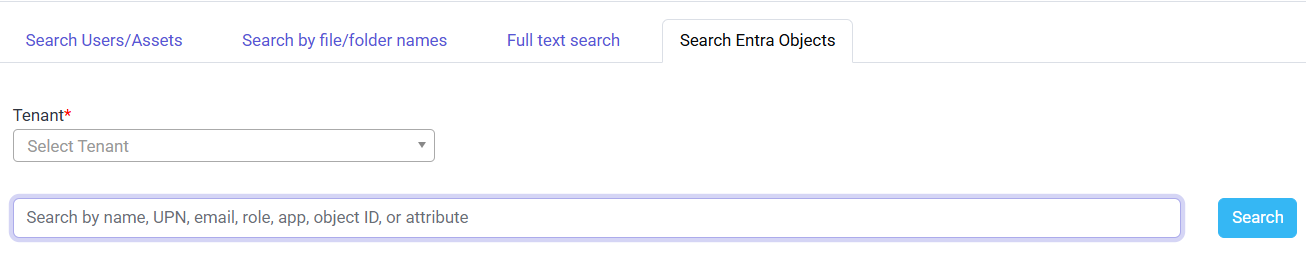
It includes the following fields:
Tenant — Select the Microsoft Entra tenant in which you want to search. This is useful when your CrashPlan environment is configured with multiple tenants.
Search by name, UPN, email, role, app, object ID, or attribute — Enter a value to search for a specific Entra object. You can search using:
Name — The display name of the user, group, application, or other Entra object.
UPN — The user's User Principal Name, such as
user@example.com.Email — The email address associated with the object.
Role — A Microsoft Entra role assigned to a user or service principal.
App — The name or identifier of an application.
Object ID — The unique Microsoft Entra object identifier.
Attribute — Other supported Entra object attributes that can help narrow the search.
Enter a search value and select the appropriate result to view or manage the corresponding Entra object.
Example: To locate a specific user, select the appropriate Tenant, enter the user's name, UPN, or email address in the search field, and then select the matching result.