
Search
Follow these steps to configure the Server Backup Agent package settings in the CrashPlan platform.
- Log in to the CrashPlan Administration Portal using administrator credentials.
- From the left navigation pane, click Settings.
- Navigate to Backup Agent Package Management.
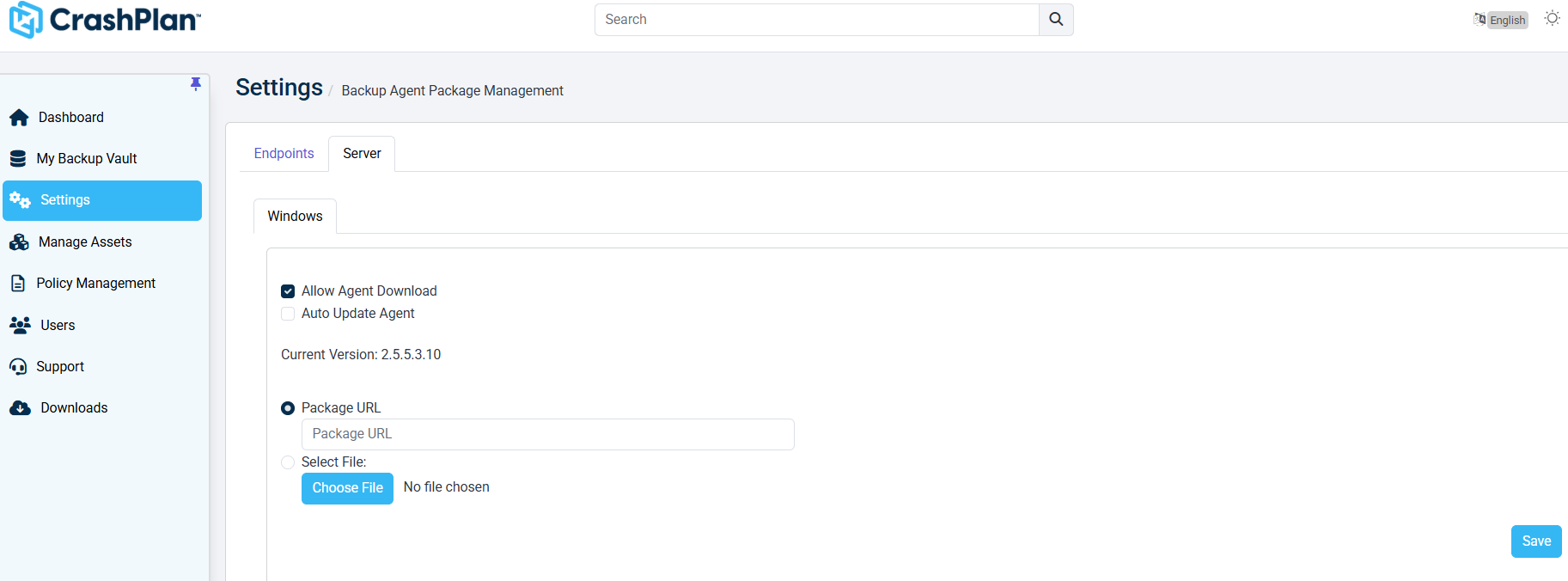
Backup Agent Package Management
Select the Server tab.
Select the required operating system tab, such as Windows.
To allow users to download the backup agent, enable the Allow Agent Download option.
To automatically update installed agents whenever a new version is available, enable the Auto Update Agent option.
Verify the displayed Current Version of the backup agent package.
Choose one of the following methods to provide the backup agent package:
Package URL
- Select the Package URL option.
- Enter the URL location of the backup agent package.
Select File
- Select the Select File option.
- Click Choose File.
- Browse and select the backup agent package file from the local system.
Click Save to apply the configuration changes.
Was this page helpful?