
To create, manage, and export users click CrashPlan Platform -> Users.
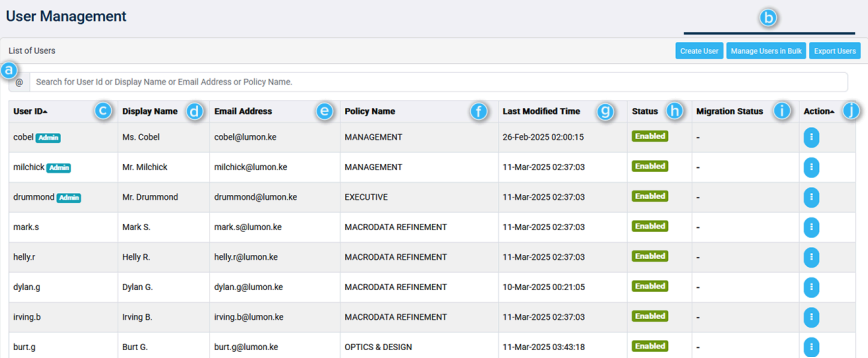
a. | Search | Search the list for a desired UserID, Display Name, Email Address, or Policy name. |
|---|---|---|
b. | Quick actions |
|
c. | User ID | A list of User IDs. |
d. | Display Name | The Display Name of the user. This may differ from the UserID and Email Address. |
e. | Email address | The email address of the user. |
f. | Policy name | Displays which policy the user is governed by. |
g. | Last Modified Time | The date and time when the user's information was last changed. |
h. | Status | Shows whether or not the user is active. |
i. | Migration Status | Shows the user's migration status (if applicable). |
j. | Actions | Refer Navigation for information on User Profile and Edit Profile page. |
Microsoft 365 Information
Name | Description |
|---|---|
Microsoft Exchange Backup | Toggle this parameter on or off.
|
OneDrive for Business Backup | Toggle this parameter on or off.
If backup is enabled for the user, choose a OneDrive for Business in the dropdown menu to apply. |
SharePoint Online Backup | Toggle this parameter on or off.
If backup is enabled for the user, choose a SharePoint Online Backup Policy Name in the dropdown menu to apply. |